The quick answer
If a manual attack crashes, reload the pre-battle autosave and retry. If it crashes again, choose auto-resolve when offered. Hotfix 1.1.289 fixes the Olympia quest bug where advancing from a colony could leave Build a Temple impossible.
Match the problem to the right fix
| What happened | Status in 1.1.289 | First thing to do |
|---|---|---|
| The game closed during a battle you started | Known issue during attacks | Reload the pre-battle autosave. Use auto-resolve if manual play keeps crashing. |
| Olympia advanced while you were in a colony and now asks for Build a Temple | The colony-triggered blocker was fixed | Update, keep the current save, and check the objective from the main city. |
| Rule Atlantis is blocked because you cannot import spices or upgrade barracks | Reported by players and acknowledged for investigation | Record the trade partner, offered goods and the barracks requirement. The Atlantis combat balance change does not establish a trade fix. |
| The game closes when removing the Athena statue while paused | Reported during the Temple of Athena mission | Keep a copy of the save before the removal. Send the build and exact sequence to support. |
| A save failed to open after changing the game language | That load crash was fixed | Update and retry the same save once. The patch notes still list a separate issue with text in parts of the Quest tab. |
Recover a manual battle without replaying your city
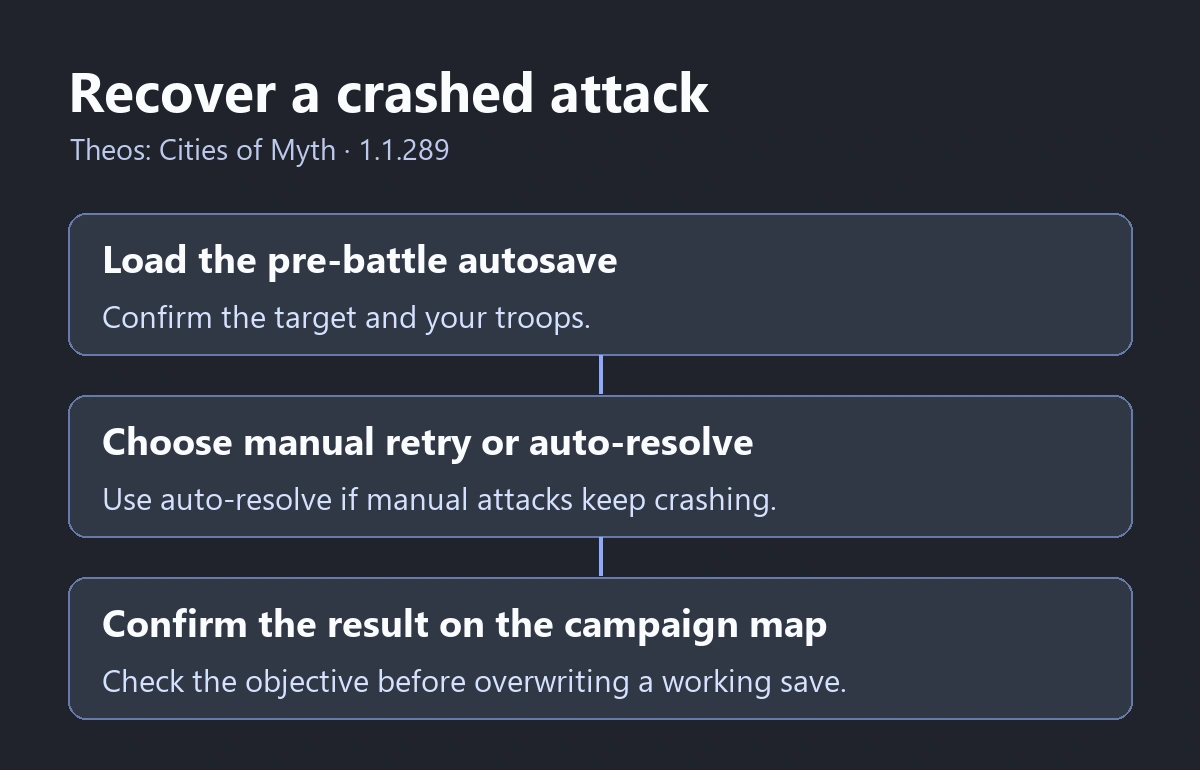
- Relaunch Theos and open the autosave just before the attack. Triskell says the game autosaves before every battle. Check that the destination and your troops match the attack you were about to make.
- Retry manually if you want to control the battle. If the crash repeats, reload the same checkpoint and choose auto-resolve when the encounter offers it. This skips the manual battle that triggers the known issue.
- Once the outcome is recorded, return to the campaign and check the objective or world map. In Olympia, check whether Atlantis now reflects the expected outcome before saving over a working checkpoint.
Check the army or objective before committing the battle result to your ongoing save. If the game closes before you reach the battle choice or crashes during auto-resolve, record that stage in a bug report.
Unstick Olympia’s Build a Temple objective
- Check the version in the upper-left of the main menu. Use 1.1.289 or later, and preserve the current campaign save before trying a different checkpoint.
- Return to Olympia’s main city. Read the active objective there and follow its construction requirement. A temple placed in another settlement is a poor test of whether Olympia’s main-city objective can progress.
- Watch for Build a Temple to clear or for the next objective to appear. If the save is already blocked, test a separate pre-objective checkpoint if one is available. Advance the main task from Olympia and check whether it progresses. The hotfix announcement does not specify whether an already-blocked save repairs itself when loaded.
- If the obstacle is reaching Atlantis with upgraded units, check what the trade screen and barracks actually require. The published patch rebalances the direct attack on Atlantis. The player report about spice supply and barracks is a separate issue.
Preserve the save and report a different crash
For a reproducible failure, write down the game version, Adventure, active objective and the last action that succeeds. Include whether you were in the main city or a colony. A statue report should include whether the game was paused. A fight report should say whether you were attacking, defending or running auto-resolve.
On Windows, paste %USERPROFILE%\AppData\LocalLow\Triskell Interactive\Theos\Saves into File Explorer. The support reply points to that folder. If it contains the affected save, copy the relevant file while the game is closed. Start with the technical support forum and follow its instructions for sending the save or a DxDiag report.
See the Theos: Cities of Myth hub for the full-game listing and demo status.
More help with saves & setup across our game guides.
Sources
- Hotfix 1.1.289: battle crash workaround and campaign fixesTriskell Interactive / Dotemu · Checked Nov 14, 2026
- Theos bug reports and technical support forumSteam Community · Checked Nov 14, 2026
- Temple of Athena statue crash and support replySteam Community · Checked Nov 14, 2026
- Olympia Rule Atlantis spice trade and barracks reportSteam Community · Checked Nov 14, 2026