The quick answer
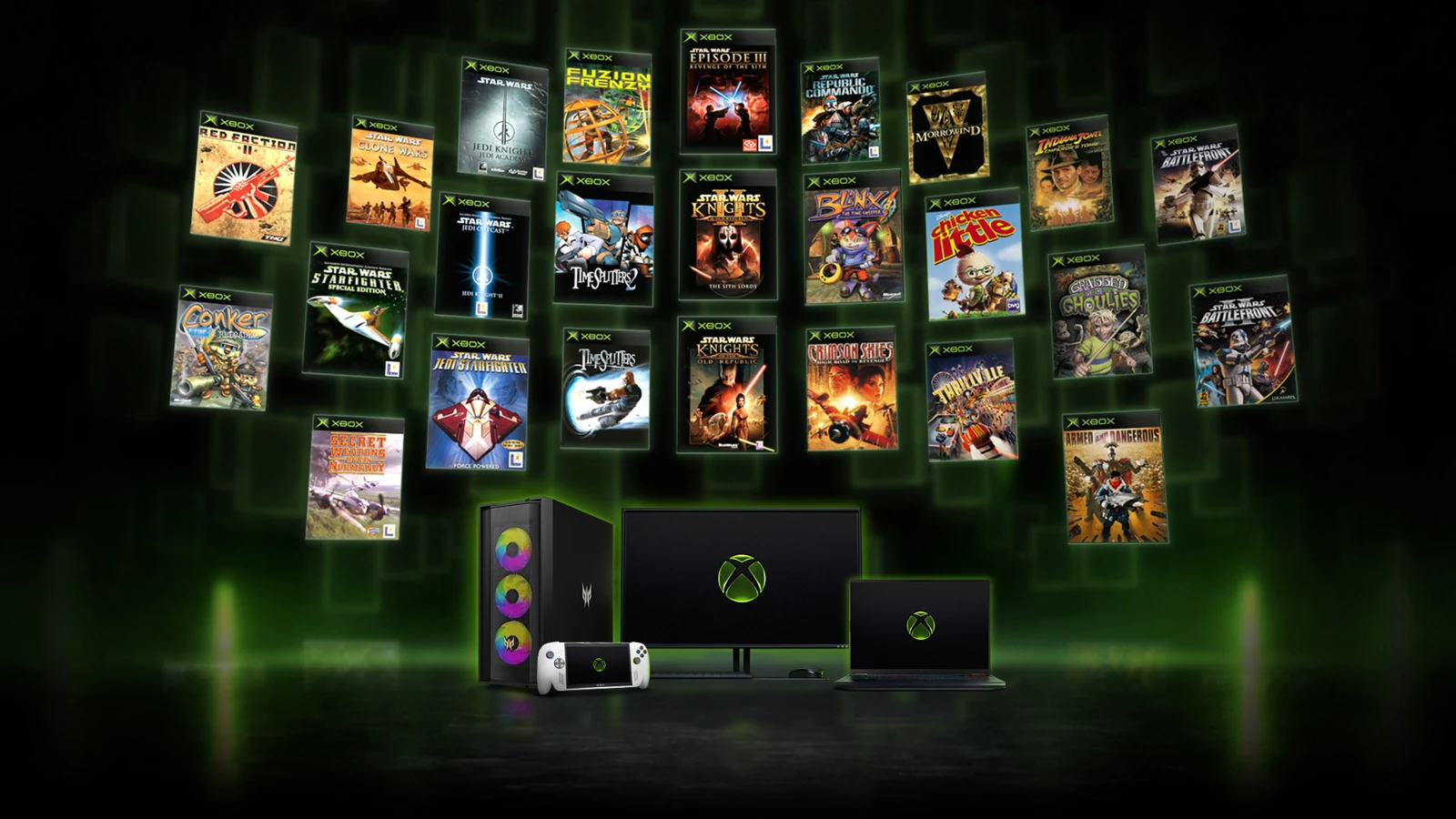
Open the Xbox app on a Windows 11 PC, sign in to your Microsoft account, and search for the game from the list below. Xbox added 21 games on November 12, bringing the PC catalog to 25. Check the game’s PC listing for purchase or Game Pass access before downloading.
Find and install the Xbox edition on Windows 11
- Find your game in the table below. Open its Xbox Store listing and look for PC under Play with. In the backward compatibility library, use Original Xbox games and the PC filter when browsing the catalog.
- Open the Xbox app on Windows 11. Use the Microsoft account that holds the Xbox digital purchase or the applicable Game Pass subscription. If you already own a supported digital Xbox Play Anywhere edition, check My Library before buying.
- Open the matching entry and choose Install when the app shows access. If the app offers a purchase or subscription instead, check the PC listing, your account and the available access for your market.
- After the download completes, launch from the Xbox app. Xbox Wire says the 25 games support mouse and keyboard after the November update. In-game features vary by title.
Microsoft’s PC program requires a game download and is available in select markets. Xbox Wire’s July launch requirements list Windows 11, 8 GB of RAM and a graphics card with 4 GB of video memory at minimum. Check the individual PC listing for the game you plan to install.
Full list of original Xbox games available on PC
The table is alphabetical. Use your browser’s Find command to jump to a title such as Morrowind, TimeSplitters or Knights of the Old Republic. Each title opens its Xbox listing. Listed marks a Game Pass mention in Xbox Wire’s November announcement. Added marks one of the four achievement updates.
Get KOTOR achievements on the Xbox edition
Xbox added achievements to both Knights of the Old Republic games, BLiNX: The Time Sweeper and Conker: Live and Reloaded. The rollout covers the compatible Xbox editions on PC, Xbox One and Xbox Series consoles. Xbox asks console players to update the system, and says some achievements can unlock from existing progress.
If you own a same-named Steam game, check which edition you are launching. For this rollout, use the Xbox listing linked in the table and launch the corresponding entry from the Xbox app. The Xbox Store marks the first Knights of the Old Republic as Xbox Play Anywhere and lists Xbox achievements and Xbox cloud saves. That gives you a concrete edition to check. Xbox’s announcement does not confirm importing saves from the native Steam edition or from an original console.
What to check when a game or feature is missing
| What you see | What to check |
|---|---|
| The game appears on Xbox console only | Open the linked listing and check Play with → PC. In the compatibility library, check that the PC filter is active. |
| Your Xbox app asks you to buy a game you own | Compare the store title and edition and confirm the app is signed in to the purchasing account. For supported digital Play Anywhere purchases, check My Library. |
| Your plan is active but the game has no Install button | Check the current access offer in your market and whether your subscription includes PC access for that title. The table records announcement-day Game Pass mentions. |
| You only have the original disc or run Windows 10 | The PC rollout requires Windows 11. Xbox limits Play Anywhere to digital games, and its PC announcement gives no separate disc-based installation method. Check PC access before buying another copy. |
| You want online multiplayer in TimeSplitters | Check the specific edition and platform. Store pages can show capabilities for multiple platforms together. The Xbox listings and rollout do not establish PC-to-console play, working PC sessions or the setup steps for them. |
To find your anniversary recap and historical Xbox stats, see the Xbox Playback guide.
More help with version changes across our game guides.
Sources
- November 12 catalog expansion, achievements and availabilityXbox Wire · Checked Nov 14, 2026
- July launch, Xbox app access and PC requirementsXbox Wire · Checked Nov 14, 2026
- Backward compatibility library and PC filtersMicrosoft Xbox · Checked Nov 14, 2026
- Play Anywhere digital access and My LibraryMicrosoft Xbox · Checked Nov 14, 2026
- Windows Xbox appMicrosoft Xbox · Checked Nov 14, 2026
- TimeSplitters 2 platform details and capabilitiesMicrosoft Xbox · Checked Nov 14, 2026
- TimeSplitters: Future Perfect platform details and capabilitiesMicrosoft Xbox · Checked Nov 14, 2026